

LIBRARY
Using the Library
The Library Service Desk is staffed 8.30am-5pm Monday to Friday.
Accessible entrance
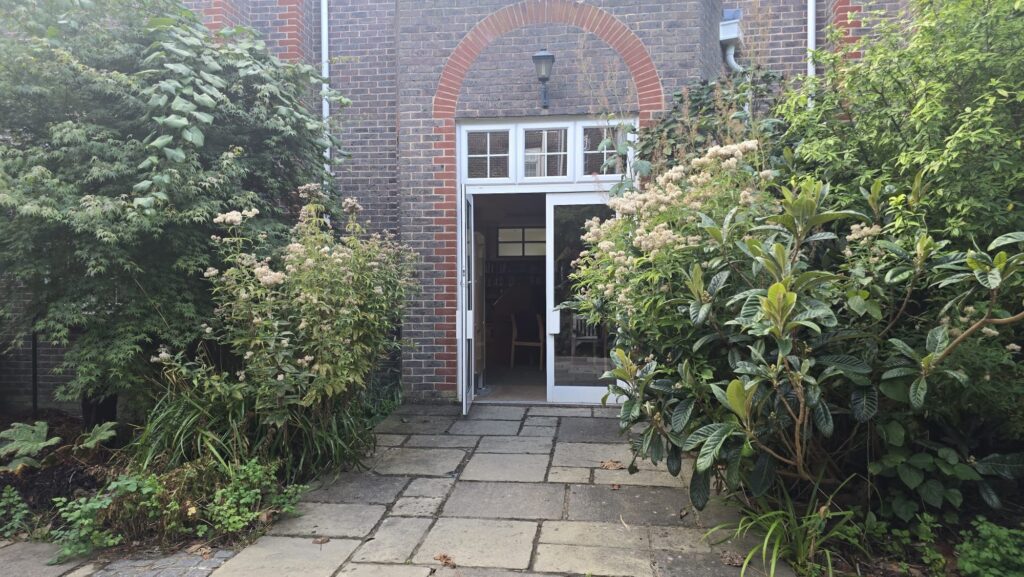
There are steps at the two internal entrances to the Library, which may be unsuitable for some users. A step-free entrance is located via the external doors. There is an accessible route from Reception around the main building to the accessible Library entrances.
What3words address: ///asset.fetching.forced and ///edicts.thinnest.fall
The Library aims to make its services accessible to all. If you experience a problem or have a suggestion to improve access, please email library@plumpton.ac.uk
Using the Building
Getting into the Library
There are steps at the two internal entrances to the Library, which may be unsuitable for some users. A step-free entrance is located via the external doors. There is an accessible route from Reception around the main building to the accessible Library entrances.
What3words address: ///asset.fetching.forced and ///edicts.thinnest.fall
Book picking service
If you require help finding books in the library we can provide a book picking service to assist you.
Please email your requests to library@plumpton.ac.uk and include the following information:
Your student number
Book title
Shelfmark (eg. 634.8 ABC)
Requests should be collectable from the Library Service Desk within 24 hours Monday to Friday. You will receive an email telling you the books are available for collection. A maximum of five books can be requested at any one time.
Using Resources Online
Support using the Library’s digital resources
The Library runs a programme of practical workshops throughout the year. You can also request 1:1 and group training sessions to support your specific needs.
Alternative formats
Students who are unable to use print resources may request specific texts in alternative formats. If you require alternative formats please contact library@plumpton.ac.uk. It may not always be possible to purchase items in other formats.
Library search accessibility
<Need information on using 247lib with screen readers>
Digital accessibility
Search the accessibility information <link to Accessibility page> and get support for using the online database subscriptions in our resources.
Make files accessible
Use RoboBraille to convert your files into a format that is accessible for you. PDFs, JPEGs and other formats can be converted into audio, brailled, text files and more.
How to reformat files for accessibility
Use RoboBraille to convert your files into a format that is accessible for you. PDFs, JPEGs and other formats can be converted into audio, brailled, text files and more.
Finding eBooks with the Library Catalogue
To access an eBook from the Library Catalogue, follow the steps below:
- Search the Library Catalogue for the book you require
- eBooks will be marked [electronic resource] next to the title. Click the title to access the next page
- To access the electronic resource, look for “URL Link” and select “Click here to view”
- You will then be taken to a login page, enter your credentials and click “Login”.
- You will then arrive at the eBook main page where you can read online or download
Other Available Support
Personal Support
If you need personal support involving your health, finances or any other barriers in your life that affect you managing your library account then please contact us as soon as possible.
The Student Services team is also available to offer guidance on how you should proceed in the event of any crisis affecting your studies.
With your permission, they will advise the Library if you are facing any barriers that may affect your library account. You are welcome to discuss these issues with the Library directly. We will do what we can to help in the first instance and advise you on the best course of action to take in order to manage your library account effectively whilst you study. Any information you give us will be treated confidentially. Email us a library@plumpton.ac.uk.
Shelfmarks and subjects
500 – Natural sciences and mathematics
502 –
504 –
510 – Mathematics
519 – Probabilities and applies mathematics
520 – Astronomy
528 –
540 – Chemistry
541 – Physical chemistry
550 – Earth sciences and geology
551 – Geology, hydrology, meteorology
556 – Earth sciences of Africa
560 – Fossils and prehistoric life
570 – Biology
573 – Specific physiological systems in animals, regional histology and physiology in animals
574
575 – Specific parts of and physiological systems in plants
576 – Genetics and evolution
577 – Ecology
578 – Natural history of organisms and related subjects
579 – Natural history of microorganisms, fungi, algae
580 – Plants
581 – Specific topics in natural history of plants
582 – Plants noted for specific vegetative characteristics and flowers
590 – Animals (Zoology)
591 – Specific topics in natural history of animals
592 – Invertebrates
593 – Miscellaneous marine and seashore invertebrates
595 – Arthropoda
597 – Cold-blooded vertebrates
598 – Aves (birds)
599 – Mammalia (mammals)
600 – Technology (applied sciences)
610 – Medicine and health
611 – Human anatomy, cytology, histology
612 – Human physiology
613 – Personal health and safety
615 – Pharmacology and therapeutics
616 – Diseases
620 – Engineering
621 – Applied physics
629 – Other branches of engineering
630 – Agriculture
631 – Specific techniques; apparatus, equipment, materials
632 – Plant injuries, diseases, pests
633 – Field and plantation crops
634 – Orchards, fruit, forestry
635 – Garden crops (horticulture)
636 – Animal husbandry
638 – Insect culture
639 – Hunting, fishing, conservation, related technologies
640 – Home and family management
641 – Food and drink
650 – Management and public relations
657 – Accounting
658 – General Management
659 – Advertising and public relations
680 – Manufacture for specific uses
682 – Small forge work (blacksmithing)
690 – Construction of buildings
700 – Arts
704 – Special topics in fine and decorative arts
730 – Sculpture, ceramics and metalwork
739 – Art metalwork
790 – Sports, games and entertainment
796 – Athletic and outdoor sports and games
797 – Aquatic sports and air sports
798 – Equestrian sports and animal racing
To contact the Library, please email library@plumpton.ac.uk
Our department provides exceptional library services, vital for fostering successful education within the College.